COETZER OPTICALFIBER NETWORK SYSTEMS Technical Inquiry

How to connect fiber optic cables to an enterprise router

Fiber optic cables connect to enterprise routers via SFP/GBIC modules or through an Optical Network Terminal (ONT) for signal conversion.Key Components
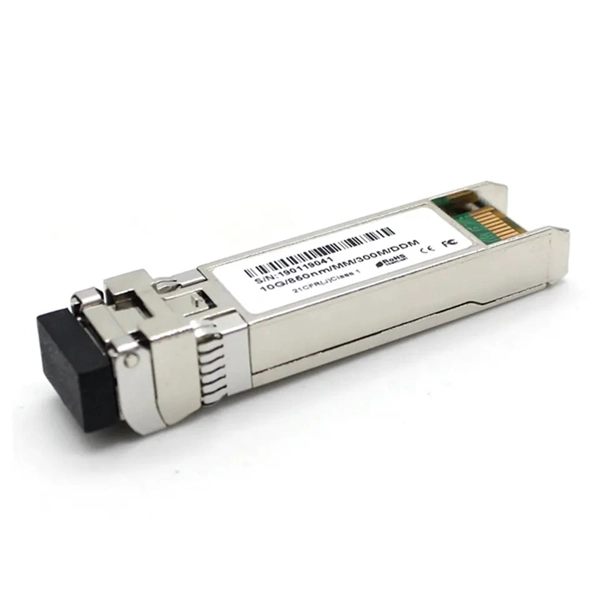
  1. SFP/GBIC Modules: Enterprise routers typically use Small Form-factor Pluggable (SFP) or Gigabit Interface Converter (GBIC) modules to interface with fiber optic cables. These modules convert optical signals into electrical signals the router can process and are hot-swappable for easy installation (Cisco documentation) .
  2. Fiber Optic Cable: Use the appropriate type of fiber—single-mode for long distances or multi-mode for shorter spans. Connectors like LC, SC, or SC/APC are common depending on the module and patch panel configuration .
  3. Patch Panels: In enterprise setups, fiber cables often terminate at a fiber patch panel, which organizes and routes connections to the router ports .
Step-by-Step Connection
  1. Install SFP/GBIC Modules: Insert the SFP or GBIC module into the router's designated WAN or LAN port. Ensure it is fully seated and compatible with the fiber type you are using .
  2. Connect Fiber to Patch Panel: Use SC to LC duplex fiber cables to link the router ports to the corresponding ports on the fiber patch panel. Each LAN port may connect to multiple patch panel ports depending on network design .
  3. Link to ONT (if required): For ISP-provided fiber, the optical signal may terminate at an Optical Network Terminal (ONT). Connect the fiber cable to the ONT's optical port, then use an Ethernet cable from the ONT to the router's WAN port .
  4. Power and Configuration: Power on the ONT first, wait for the optical link to stabilize, then power on the router. Access the router's admin interface to configure WAN settings, VLANs, or Quality of Service (QoS) as needed .
Best Practices
  • Handle Fiber Carefully: Avoid touching the fiber tip; dust or scratches can degrade signal quality .
  • Verify Compatibility: Ensure the SFP/GBIC module matches the fiber type and distance requirements (e.g., 1000BaseSX for multi-mode, 1000BaseLX for single-mode) .
  • Check Status Lights: Confirm the router and ONT indicators show active connections (solid green or blue lights) .
  • Environmental Considerations: Place the router and ONT in a dry, ventilated area with surge protection . By following these steps, an enterprise router can reliably interface with a fiber optic network, ensuring high-speed, low-latency connectivity suitable for demanding enterprise applications.
How to connect fiber optic cables to an enterprise router

How to Connect Fiber Optic Cable to Router: A Step-by-Step Guide

Connecting a fiber optic cable to a router might seem daunting at first, but with the right tools and a bit of patience, it''s a

How to connect a fiber optic cable to the router

Connect the fiber optic cable to the router: Carefully insert the end of the fiber optic cable into the corresponding port

How to Connect Fiber Optic Cable to Router: A Step-by-Step Guide

Connecting a fiber optic cable to a router is a straightforward process that can greatly enhance your internet experience. By following

How to connect fibre optic cable to router with LAN port

I have a fibre optic cable incoming to an ONS, on the way out of the ONS is also a fibre optic cable which goes directly

Fiber Optic Cable Buying Guide

Fiber Optic Cable Buying Guide Understand how to choose fiber optic cable by comparing single‑mode vs. multimode, network

How do i connect fiber optic cable to ethernet?

Step 4: Connect to the Network If using a network switch with SFP ports, insert the fiber optic transceiver into the SFP port and

Fiber Optic Cable Installation Process: Connecting Homes

The fiber optic cable installation process, meaning connecting homes with internet service, is becoming increasingly critical and

Related Video Reference

This video was associated with the source search result. Verify technical details against current product documentation and project requirements.

Technical note

This reference is intended for preliminary optical-network research. Compatibility, link budgets, installation methods, test limits and applicable standards must be verified for the specific project.

Still Have a Technical Question?

Use the inquiry form to describe a fiber link, component choice or testing question.

Start an Inquiry